
Getting a new vehicle? Congratulations!
If you are replacing your vehicle, the best option is to update the vehicle currently on your Jax & Jilly’s Unlimited Club account. This allows any remaining time on your membership to transfer to your new vehicle so you do not lose any unused time.
How to Update Your Vehicle
1. Log into your account
2. Locate the vehicle you would like to replace
3. Under the Vehicle Info section, click the edit icon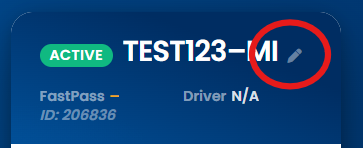
4. Enter your new license plate number (if changed)
5. Enter your new vehicle make/model information (if changed)
6. Verify the information is correct and click SUBMIT
7. Return to the Dashboard and confirm your updates were saved correctly
Thank you for choosing Jax & Jilly’s Car Wash, and congratulations on your new vehicle!